
Table of content
- What is MARD and Why it Matter for Accuracy
- How Dexcom G7 Delivers Real-time Accurate Glucose Readings
- Does Sensor Placement Affect the Accuracy of Dexcom G7?
- Dexcom G7 Warm-Up Time: and Post-Startup Accuracy
- Do You Need to Calibrate Dexcom G7?
- Dexcom G7 Sensor Life For Accuracy
- Dexcom G7 Accuracy vs. Blood Glucose Watches
- Dexcom G7 Accuracy in Real Diabetic Cases
- Need Help with Dexcom G7? Support & Replacement Info
- Conclusion
- Frequently Asked Questions
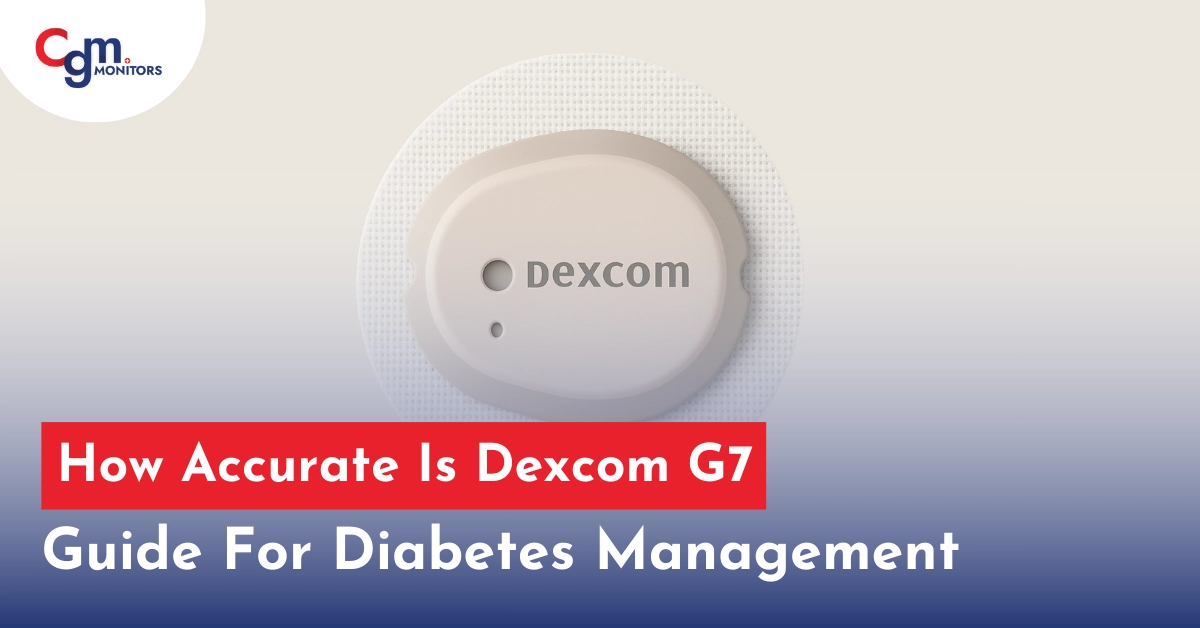
How accurate is the Dexcom G7? Yes, Both Dexcom G7 sensors (10 or 15 days) are highly accurate, featuring a MARD of 8.2% for 10 days version and 8.0% for 15 days version, that is recently launched in late 2025. These features make them both the most trusted, accurate continuous glucose monitors (CGMs) available for both types of diabetes. Dexcom CGM sensors shows roughly of readings within 20 points of a lab reference and require no fingersticks for treatment decisions. For users managing diabetes through CGM-based decisions, accuracy is essential, not optional.
Dexcom G7 offers next-generation performance, designed to eliminate routine fingersticks and provide continuous glucose data every 5 minutes. With an industry-reported MARD of 8.2% and a significantly faster warm-up time compared to the Dexcom G6, it offers a superior experience for both clinicians and DMM users.
This blog reviews the clinical and user-based performance of the Dexcom G7, covering sensor accuracy, G6 vs. G7 comparison, setup and insertion steps, calibration guidance, warm-up timing, placement tips, and usage with the app or receiver kit.
What is MARD and Why it Matter for Accuracy
Accuracy for CGM devices like the Dexcom G7 is often expressed through MARD (Mean Absolute Relative Difference) a statistical value that represents the average deviation of sensor glucose values from laboratory reference standards. Lower MARD values indicate greater accuracy.
- Dexcom G7 (10 OR 15 days): 8.2% MARD (adult)
- Dexcom G7 (10 OR 15 days): 8.1% MARD (children)
- FDA standard: <10% for non-adjunctive dosing approval
With a MARD well below 10%, both Dexcom G7 supports insulin dosing decisions without confirmatory fingersticks.
Dexcom G7 vs. G6 Accuracy: Is the Upgrade Worth It?
| Feature | Dexcom G6 | Dexcom G7 |
| MARD | ~9.0% | 8.2% |
| Warm-Up Time | 2 hours | 30 minutes |
| Calibration Needed | Optional | Factory-calibrated |
| Sensor + Transmitter | Two-piece | All-in-one |
| Wear Duration | 10 days | 10 days |
| App Setup Speed | Moderate | Faster pairing |
| Size | Larger | 60% smaller |
The Dexcom G7 introduces a more compact, streamlined design that improves comfort, makes insertion easier, and shortens the setup process compared to the G6.
You will be surprised that, in late 2025, Dexcom launched its new Dexcom G7 Sensor. What is new? In this new CGM G7 sensor, diabetic users can enjoy 15 days of weartime with 12 hours of grace time. You need just 2 sensors for a complete month. Where you can purcahse? Do not worry you can reading this article with a solution of ommon queiries and we have this solution too. CGM Monitors has listed 15 days Dexcom G7 sensors with a support of insurance claim. Go and get it and manage your glucose monitoring with confidence.
How Dexcom G7 Delivers Real-time Accurate Glucose Readings
The Dexcom G7 system includes a combined sensor-transmitter unit that continuously samples interstitial fluid glucose and wirelessly transmits data to a smartphone or receiver every 5 minutes.
- Uses Bluetooth Low Energy (BLE)
- Sends predictive alerts for highs or lows
- No fingerstick calibration needed
- Compatible with iOS/Android and dedicated receiver
This real-time connection supports timely therapeutic decisions and proactive diabetes management.
Does Sensor Placement Affect the Accuracy of Dexcom G7?
Correct sensor placement directly affects data reliability. Dexcom G7 is FDA-approved for placement on the back of the upper arm for both adults and children. Off-label sites include:
- Abdomen: Common among adults, offers good stability
- Thigh: Off-label, but used for discretion and comfort
- Avoid areas with scarring, tattoos, or pressure zones
Many users report that consistent accuracy improves when the sensor is applied to soft, stable tissue on the back of the upper arm. Placement on scarred or compressed areas, especially for side sleepers, may contribute to brief accuracy shifts during the first day.
Is Dexcom G7 Accurate on Arm, Abdomen, or Thigh?
Here is the answer within the greater than signs: Abdomen > Arm > Thigh. What does it mean? It means the abdomen is most accurate (FDA-approved), the arm works well off-label for most users, and the thigh is the least reliable due to compression issues.
Here is the expert’s guide that will help you on how to place the Dexcom G7 sensor along with FDA-approved and off-label sites.
Does Insertion Affects Dexcom G7 Accuracy & Comfort
The Dexcom applicator has been reengineered for a seamless, single-button insertion process. Each sensor pack includes an all-in-one applicator to:
- Clean the site and remove the adhesive liner
- Press the button when you place sensor on the skin
- The sensor inserts and adheres in a single step
- No separate transmitter is required, minimizing setup errors
Dexcom G7 Warm-Up Time: and Post-Startup Accuracy
One of the most noticeable improvements in G7 is its 30-minute warm-up period, which is significantly shorter than G6.
- Post-warmup, the sensor undergoes a brief background update before it starts transmitting data:
Status: “Sensor warming up” → “Sensor updating” - First data stream begins automatically
- Accuracy improves within the first 6-12 hours
Tip: Avoid heavy activity or hydration swings during the first few hours for optimal accuracy.
Do You Need to Calibrate Dexcom G7?
How long does it take for Dexcom G7 to calibrate? Although the Dexcom G7 is factory-calibrated, some patients found that calibrating after 24 hours, particularly in a fasting state, helped sync sensor readings with their blood glucose monitor. This can be especially helpful for those who notice persistent discrepancies early in the wear cycle.
However, optional calibration is available when:
- Symptoms don’t match sensor readings.
- Users confirm a discrepancy with a glucometer.
- After accidental pressure on the sensor.
If readings seem off, manually calibrate using these settings:
- Open Dexcom G7 app > Settings > Calibrate
- Enter the value from an FDA-approved glucose meter
App vs Receiver: Which Gives Better Accuracy?
Users can operate the G7 system through a smartphone app or a Dexcom G7 receiver kit. Both methods provide an intuitive interface for easy setup and real-time monitoring.
App Setup:
- Download the Dexcom G7 App
- Scan sensor code or manually input it
- Confirm insertion and wait for warm-up
Receiver Setup:
- Charge and power on the device
- Go to ‘Start New Sensor’
- Enter sensor code, wait for sync
You can use both simultaneously for redundancy and remote monitoring.
Dexcom G7 Sensor Life For Accuracy
Standard Dexcom G7 sensor lasts 10 full days, and the newly launched premium version lasts 15 days with a 12 hours of grace time. Upon expiration:
- The app or receiver alerts you when the sensor expires.
- Remove the old sensor and dispose of it properly, following the disposal guide.
- Insert a new sensor to begin a new 30-minute warm-up.
Setup and Maintenance Guide
As a DMM provider working directly with CGM users daily, our support team often receives firsthand reports on Dexcom accuracy concerns, especially during warm-up or in early placement hours.
Here is a reference table for clinical clarity:
| Task | 10-Day Dexcom G7 | 15-Day Dexcom G7 | Notes |
|---|---|---|---|
| Sensor Warm-Up | 30 minutes | 30 minutes | No input needed during warm-up |
| Insertion Process | < 1 minute | < 1 minute | Single-button applicator |
| App Syncing | ~5 minutes | ~5 minutes | Scan or manual code entry |
| Sensor Duration | 10 days | 15 days | Replace after system alert |
| Calibration Frequency | Not required | Not required | Manual option available if needed |
Dexcom G7 Accuracy vs. Blood Glucose Watches
Blood glucose watches marketed online often rely on optical or biosensor tech that lacks FDA clearance. These devices:
- Are not approved for insulin dosing
- Provide trend estimates, not clinical data
- Cannot replace CGMs like Dexcom G7
Only FDA-cleared CGMs like the Dexcom G7 offer medically actionable readings.
Dexcom G7 Accuracy in Real Diabetic Cases
- Children (2+ years): Approved with adult supervision
- Pregnancy: Off-label, but used with endocrinologist guidance
- Elderly users: Fewer steps and auto-updates reduce errors
- Athletes: Compact size allows secure wear during training
Need Help with Dexcom G7? Support & Replacement Info
Should you experience issues:
- Contact Dexcom Support for sensor or transmitter replacements
- Refer to the official G7 user guide for troubleshooting
- Check our website for reorder assistance
Conclusion
The Dexcom G7 delivers advanced CGM accuracy and ease of use for diabetes patients and clinicians using DMM. With a clinically validated MARD of 8.2%, factory calibration, shorter warm-up time, and one-step insertion, Dexcom G7 reduces user burden while delivering real-time, actionable glucose data. It has distinct benefits and improved performance over its predecessor, the Dexcom G6, and offers a better patient experience.
The portability and flexibility of the G7 in various placement locations and no-stick station make it ideal for patients seeking precise control. Whether you’re a current CGM user or new to glucose monitoring, Dexcom G7 provides a data-driven, FDA-cleared solution for modern diabetes care.
Frequently Asked Questions
Can I put Dexcom G7 on my stomach?
Yes, but it’s not an FDA-approved site. The upper arm is the official location.
How accurate is the Dexcom G7 compared to a fingerstick test?
The Dexcom G7 offers high accuracy for CGM by measuring interstitial fluid. It may show slight differences from fingerstick tests that directly assess blood glucose levels due to a natural lag of about 10-15 minutes. This makes the G7 a reliable tool for diabetic patients to track trends over time, while fingersticks remain the gold standard for immediate, precise readings to guide treatment decisions. CGM Monitors recommend you to compare the two methods, especially when discrepancies arise.
How do you calibrate a Dexcom G7 if you suspect inaccuracy?
Although the Dexcom G7 is factory-calibrated and typically doesn’t require routine adjustments, CGM users can improve readings if inaccuracies are suspected by entering a fingerstick blood glucose value via the app or receiver. To do this, tap the plus icon in the glucose or history tab, select “use as calibration,” and follow the prompts to input the value within five minutes of testing. This optional step helps align interstitial fluid measurements with blood levels, enhancing reliability for better daily diabetes control without over-relying on manual interventions.
How does the Dexcom G7 MARD compare to other CGM devices?
The Dexcom G7 (both versions) has a MARD of around 8.2% for adults and 8.1% for children, placing it among the most accurate CGMs available and comparable to devices like the FreeStyle Libre 3, which reports similar values ranging from 8.2% to 9.4% depending on studies and user groups. Some research shows variations, with the G7 occasionally outperforming or matching competitors in real-world scenarios, helping diabetic patients select a system that provides consistent data for informed glucose management.
What factors can affect the accuracy of Dexcom G7 readings?
Accuracy of the Dexcom G7 can be influenced by factors such as sensor placement on the arm or abdomen, medications like high doses of acetaminophen or hydroxyurea, and physical pressure on the device during sleep or activity. Additionally, readings may vary during the first 24 hours after insertion, rapid glucose fluctuations, or if hands aren’t clean for comparison tests, so diabetic patients should monitor these elements to maintain reliable data. By being aware of these influences, users can take steps like proper site rotation and avoiding interferences to optimize the device’s performance in daily diabetes care.
What does a lower MARD percentage indicate for Dexcom G7 users?
A lower MARD percentage for the Dexcom G7 means the device’s glucose readings are closer on average to actual blood levels measured by reference tests, signaling greater overall precision. For diabetic patients, this translates to more dependable data for tracking trends, adjusting insulin, and preventing highs or lows, though real-world factors like individual physiology can still play a role. Embracing a device with low MARD empowers users to make confident decisions in their diabetes routine.
Why is MARD an important metric for CGM accuracy?
MARD serves as a key standard for evaluating CGM accuracy by averaging the relative differences between device readings and reference glucose values, with lower numbers indicating better performance. It’s vital for diabetic patients because it helps compare systems like the Dexcom G7, guiding choices that support precise monitoring and safer management, even if it doesn’t capture every aspect of real-world use. Understanding MARD alongside other factors ensures more informed diabetes care strategies.
When should I trust my Dexcom G7 reading versus a fingerstick?
Trust Dexcom G7 readings for general trends and alerts, but opt for a fingerstick when there’s a significant discrepancy, such as over 20 points, during the first day of sensor use, or if symptoms like shakiness don’t match the display. Diabetic patients should also verify with fingersticks before major decisions like insulin dosing if glucose is changing rapidly or the CGM seems compressed, ensuring accuracy from blood over interstitial fluid. This balanced approach promotes safe and effective diabetes control.
Can I calibrate the Dexcom G7 manually?
Yes, via app or receiver, though it is factory-calibrated.
How long does Dexcom G7 take to warm up?
30 minutes, significantly faster than previous models.
Can I use Dexcom G7 without a doctor?
No. A prescription is required for all users.
How accurate is Dexcom G7 on the thigh?
Anecdotal evidence supports reliability, though this is an off-label site.
What is the Dexcom G7 sensor update message?
It appears post-warm-up during internal system checks and disappears once data transmission begins.
What if my Dexcom G7 doesn’t match my glucose meter?
A small gap is normal, but if Dexcom G7 readings differ significantly, verify with a glucometer and calibrate if needed for better alignment.


Write a comment
Your email address will not be published. All fields are required