
Table of content
If you’ve been on the Dexcom G6 for years, this news hits differently. Your readings are reliable. Your routine is set. And now Dexcom has confirmed that G6 manufacturing ends on July 1, 2026, after which supply cannot be guaranteed.
The good news? The Dexcom G7 is not a step down. It’s a clinically proven upgrade, and the switch is far simpler than most guides make it look.
This is your complete guide on what changes, what stays the same, when to switch, and exactly how to do it without losing a single day of coverage.
Why Is Dexcom Discontinuing the G6?
Dexcom isn’t discontinuing the G6 over a safety issue. The company confirmed it is phasing out older platforms to focus resources on next-generation CGM technology, specifically the Dexcom G7 and the Dexcom G7 15-Day sensor.
This follows the same path Dexcom has taken with every previous generation. As newer, more capable systems become widely available older models are retired.
Important Note:
G6 sensors may still appear in pharmacies for a short time after July 1, 2026. But once manufacturing stops, restocking becomes impossible. Users who wait too long risk running out mid-month with no replacement available.
If you want to understand the full context behind this change, read our blog on Dexcom G6 discontinuation in 2026, where we explain why it’s happening and what comes next.
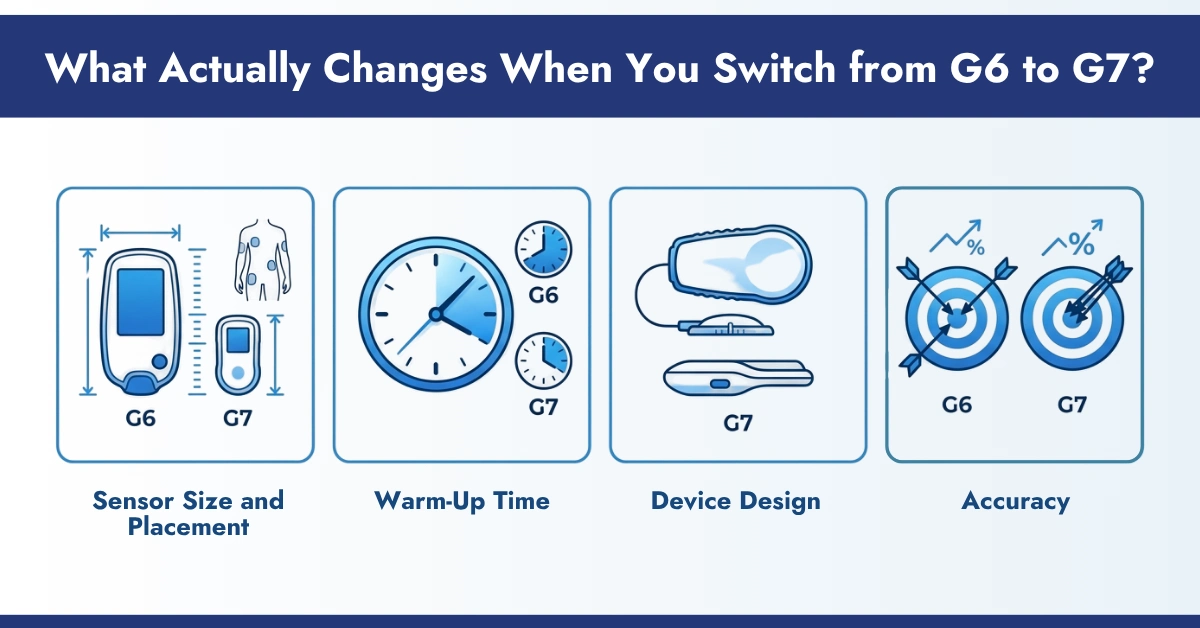
What Actually Changes When You Switch from G6 to G7?
Here’s what those specs actually feel like day to day.
- Sensor Size and Placement: The G6 sits on the abdomen. The G7 goes on the back of the upper arm. It’s noticeably smaller and far more discreet under clothing. Most users forget it’s there within a day.
The inserter is also completely redesigned. One push, all-in-one. No separate transmitter to click in, no two-step process. First-time users consistently describe it as easier than expected. - Warm-Up Time: The G6 requires a 2-hour warm-up every sensor session. The G7 cuts that to 30 minutes. For context, that’s a difference you feel every 10 days.
- Device Design: The G6 uses a separate transmitter, while the G7 uses an all-in-one sensor (no separate transmitter). This simplifies setup and reduces the components you need to manage
- Accuracy: The G7 and G7 15-Day are clinically validated as the most accurate CGM sensors on the market, outperforming the G6 in head-to-head studies. Published in Diabetes Technology & Therapeutics (2025), confirms superior mean absolute relative difference (MARD) scores compared to previous generations. That means fewer false lows, fewer missed highs, and more confident dosing decisions.
The Full Comparison
| Feature | Dexcom G6 | Dexcom G7 | Dexcom G7 15-Day |
| Manufacturing | Ends July 1, 2026 | Active | Active |
| Wear time | ~10 days | ~10 days | ~15.5 days |
| Warm-up time | ~2 hours | 30 minutes | 60 minutes |
| Transmitter | Separate, reusable | Built-in | Built-in |
| Placement | Abdomen | Back of the upper arm | Back of the upper arm |
| Inserter | Two-step process | One-push, all-in-one | One-push, all-in-one |
| Age approval | 2+ years | 2+ years | 18+ years only |
| Sensor restart | Yes (off-label) | No | No |
| App needed | Dexcom G6 app | Dexcom G7 app | Dexcom G7 app |
One real loss worth naming:
The G7 does not support sensor restarts. If you’ve been restarting G6 sensors off-label to extend wear, that option goes away. Factor this into your timing and supply planning.
When Is the Right Time to Switch G6 to G7?
Dexcom’s official recommendation is to work with your healthcare provider to transition to the G7 at your next appointment, well before July 2026. Not at the deadline. Not when your G6 supply runs out. Now.
Here’s why timing matters:
- G6 inventory is already tightening as the deadline approaches.
- Prior authorization through insurance takes 5-10 business days on average.
- Your doctor needs time to write a new prescription before your supply gaps.
The cleanest transition strategy is to finish your current G6 supply naturally, have your G7 prescription ready, and start your first G7 sensor the same day your last G6 sensor ends. That’s a zero-gap switch.
If you use an insulin pump like Omnipod 5, Tandem t:slim X2, Tandem Mobi, or the iLet Bionic Pancreas, use your remaining G6 sensors with your pump first before switching. All major AID systems are compatible with G7 and G7 15-Day.
Related: G6/G7 Vs FreeStyle vs Medtronic CGM Accuracy Comparison 2026
Step-By-Step Process of Switching Dexcom G6 to G7
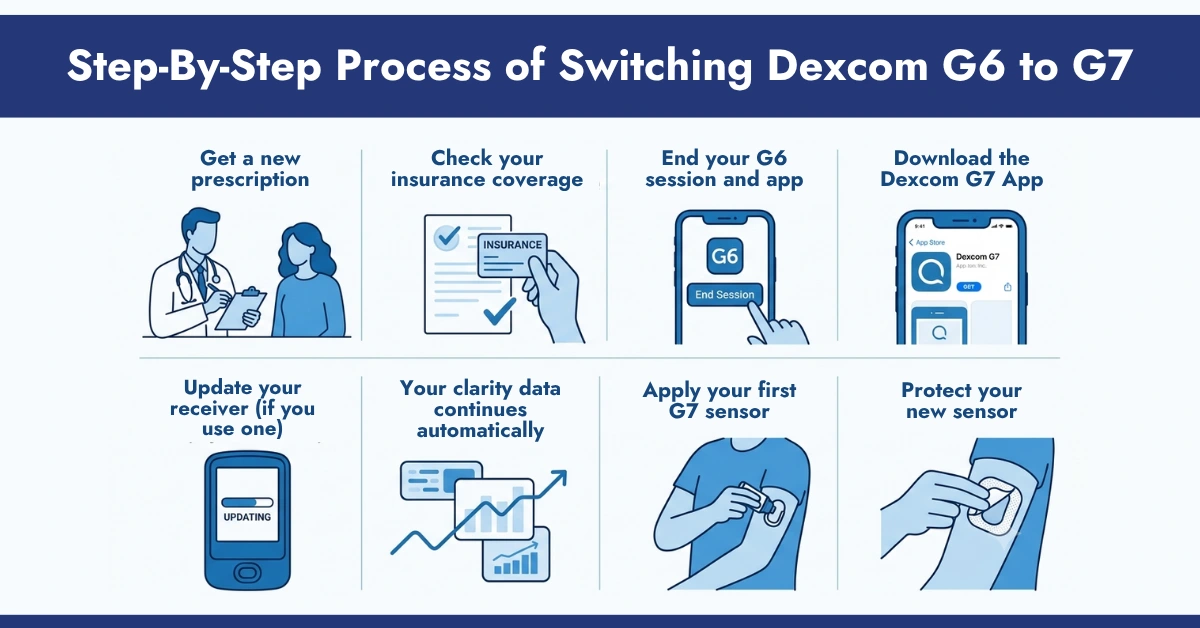
- Get a new prescription: Your G6 script does not carry over. Call your doctor ahead of your next visit and ask specifically for a Dexcom G7 or G7 15-Day prescription. Mentioning the July 2026 deadline helps move it forward quickly.
- Check your insurance coverage: If your plan covered the G6, it almost certainly covers the G7. Dexcom confirmed that G7 coverage now matches G6 coverage for Medicare, Medicaid, and most commercial insurers.
- End your G6 session and app: Open the Dexcom G6 app and select “End Sensor Session” if a session is still active. Then delete the G6 app from your phone. You won’t need it again.
- Download the Dexcom G7 App: Download the Dexcom G7 app from the App Store or Google Play. Log in with your existing Dexcom username and password.
- Update your receiver (if you use one): If you use a Dexcom receiver rather than a smartphone, it can be updated to work with the G7 15-Day sensor. Visit Dexcom’s receiver update page or call their support line for step-by-step instructions.
- Your clarity data continues automatically: Your Dexcom Clarity history does not disappear. All your glucose trend data transfers automatically when you log into the G7 app with your existing account. Nothing is lost.
- Apply your first G7 sensor: Place it on the back of your upper arm, press the one-push inserter firmly against the skin, and click. The G7 app will guide you through pairing. Warmup takes 30 minutes.
- Protect your new sensor: The G7 has a different footprint than the G6, so G6 adhesive patches won’t fit. CGM Monitors carries Dexcom G7 overlay patches and Dexcom G7 patches cut specifically for the G7 sensor profile, important for keeping adhesion secure through workouts, heat, and daily wear.
Does Insurance Cover the Dexcom G7?
In most cases, yes, at the same level as your G6 coverage.
- Medicare: 100% of Medicare patients using insulin or with a history of severe hypoglycemia have coverage for both G7 and G7 15-Day under the DME fee schedule.
- Commercial insurance: Coverage is at parity with G6 for the vast majority of plans. Dexcom confirmed this applies across BlueCross BlueShield, Anthem, and most major carriers.
- Medicaid: Coverage varies by state, but CGM Monitors accepts Medicaid in 12 states, including Arizona, Kentucky, Louisiana, Oregon, and Wisconsin, among others.
Conclusion:
The deadline is July 2026, but the right time to switch is before supply becomes unpredictable. Talk to your doctor, confirm your G7 coverage, and order your first kit through CGM Monitors today.
Browse the full Dexcom G7 range at CGM Monitors or check your insurance eligibility for free right now.
Follow CGM Monitors on Facebook and Instagram for CGM guides, insurance tips, and supply updates.
Disclaimer:
This content is shared only for learning and general awareness. It is not medical advice and should not replace guidance from your doctor or healthcare provider. Every person’s health situation is different, so always consult a qualified professional before making any decisions about your diabetes care or treatment. All images and graphics used in this content are generated using AI tools
Frequently Asked Questions
Will my Dexcom Clarity data transfer when I switch to G7?
Yes. Log in to the Dexcom G7 app using your existing Dexcom account credentials and all your Clarity history, including time-in-range, GMI, and glucose trends, transfers automatically.
Can I switch from G6 to G7 mid-sensor?
Yes. End your G6 session manually in the app, remove the sensor, and apply your first G7 sensor. You don’t have to wait for your current sensor to expire.
When should I switch from G6 to G7?
Dexcom recommends switching at your next doctor’s appointment, well before July 2026. Don’t wait until supply runs low. Getting your new prescription and insurance approval in place now prevents any monitoring gap.
Do I need a new prescription for the Dexcom G7?
Yes. Your G6 prescription does not transfer. Ask your doctor for a new G7 or G7 15-Day prescription ahead of your transition.
Is the Dexcom G7 more accurate than the G6?
Yes. Clinical studies published in Diabetes Technology & Therapeutics (2025) confirm the G7 has a lower MARD score than the G6, making it the most accurate CGM sensor currently on the market.
What happens to the G6 app after I switch?
Dexcom will continue to support the G6 app after July 1, 2026, for any unexpired sensors still in warranty. However, you will need to use the separate Dexcom G7 app once you apply your first G7 sensor.



Write a comment
Your email address will not be published. All fields are required