
Table of content
- Why CGM Is Now Essential In Type 1 Diabetes Care
- How Actually CGM Works In Children
- Which CGM Devices Are Best for Kids in 2026?
- CGM at School: Legal Rights Every Parent Must Know
- Sensor Placement & Simple Fixes To Improve Wear Time
- How to Get Your Child’s CGM Covered Without the Headache
- Conclusion:
- Frequently Asked Question
You’re not sleeping. Every few hours, you check your child. You’re terrified of an overnight low you might miss. You wonder if the school is handling their diabetes safely. This is the reality for millions of parents with type 1, and you deserve real answers, not more confusion.
Continuous glucose monitoring for children is now the standard of care for pediatric Type 1 diabetes. It watches your child’s blood sugar every few minutes, alerts you before levels become dangerous, and shares data with anyone you trust. This guide covers what actually matters: which CGM is best, how accurate they are, what the ADA recommends, how schools should handle it, and how to get it fully covered by insurance.
Why CGM Is Now Essential In Type 1 Diabetes Care
The American Diabetes Association’s 2026 Standards of Care confirms that early CGM initiation after a Type 1 diabetes diagnosis in children is linked to lower A1C levels and high parental satisfaction. In children under age 8, CGM use was associated with a measurably lower risk of hypoglycemia.
Key Benefits:
- Real-time glucose data every 5 minutes, around the clock.
- Trend arrows showing whether blood sugar is rising, falling, or stable.
- Alerts before a dangerous low or high not after symptoms appear.
- Shareable data with school nurses, coaches, and grandparents.
CGM Monitors Advice: Don’t delay starting CGM after diagnosis. The ADA now recommends considering it from the very first appointment. Speak with your child’s endocrinologist at the next visit.
How Actually CGM Works In Children
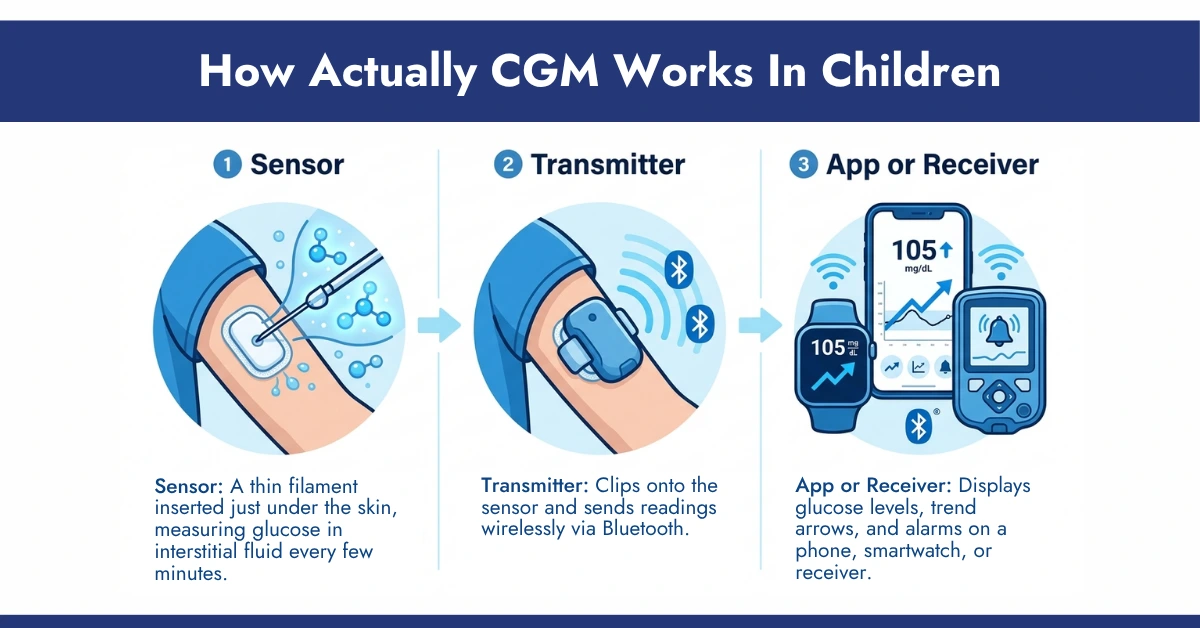
Understanding the device removes the fear of it. Every CGM has three components:
- Sensor: A thin filament inserted just under the skin, measuring glucose in interstitial fluid every few minutes.
- Transmitter: Clips onto the sensor and sends readings wirelessly via Bluetooth.
- App or Receiver: Displays glucose levels, trend arrows, and alarms on a phone, smartwatch, or receiver.
Important Truth Parents Must Know:
You see a number, a direction arrow, and receive customizable alerts. Devices like the Dexcom G7 and FreeStyle Libre 3 plus push alarms directly to your phone, whether your child is at school, at practice, or asleep in the next room.
Do You Know?
CGM readings measure glucose in fluid around cells, not directly in the blood. This can cause a delay of up to 15 minutes. If your child shows symptoms that don’t match the CGM reading, always confirm with a finger-stick test.
Which CGM Devices Are Best for Kids in 2026?
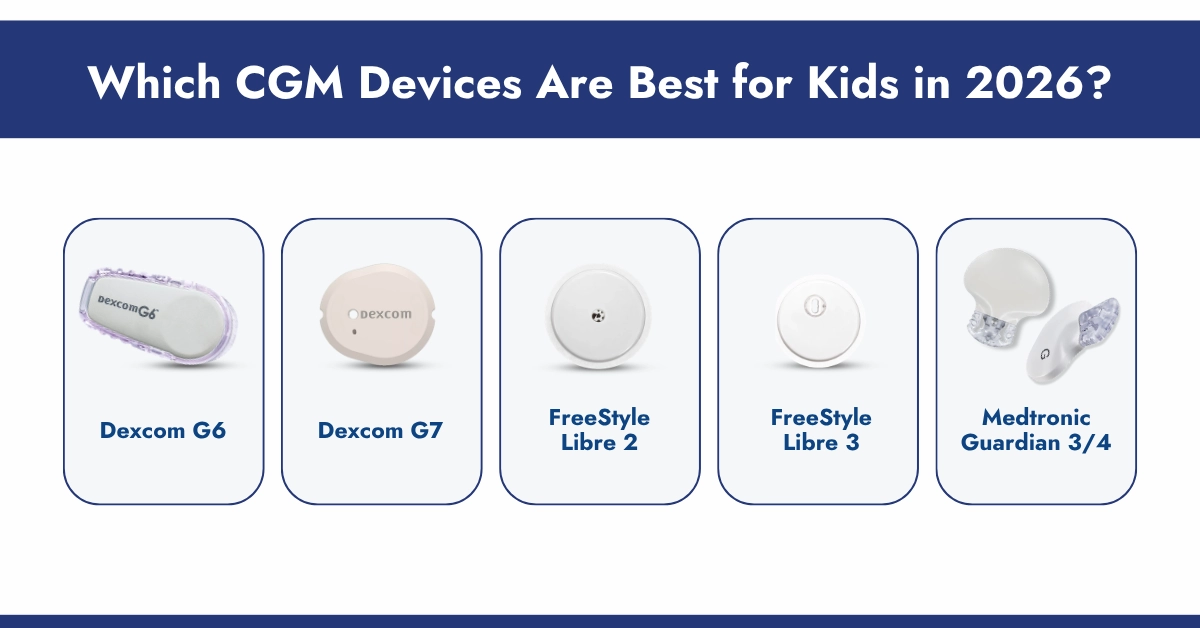
Here’s what actually matters for different ages and lifestyles:
| Feature | Dexcom G7 | FreeStyle Libre 2 Plus Sensor | FreeStyle Libre 3 Plus Sensor | Medtronic Guardian 3/4 |
| Best For | Active teens & adults | Budget/ Simplicity | Toddlers, comfort, swim safe | Calibration-free pump use |
| Reading Frequency | Every 5 mins | Every 1 min (viewable on scan) | Every 1 min (Bluetooth) | Every 5 mins |
| Size | 60% smaller than G6 | Small and discreet | Small and lightweight | Larger pump integration sensor |
| Wear Time | Up to 10 days (+12h grace) | Up to 15 days | Up to 15 days | Up to 7 days |
| Warm-up Time | <30 mins | 1 hour | 1 hour | 2 hours |
| Min. Age (FDA) | 2+ years | 2+ years | 2+ years | 7+ years |
| Remote Sharing | Yes (Dexcom Follow) | Yes (LibreLinkUp) | Yes (LibreLinkUp) | Yes (CareLink) |
| Calibration Required | No | No | No | No |
| Receiver Options | Phone, Receiver, Watch | Phone or Reader | Phone or Reader | Medtronic Pump or Phone |
| Water-resistance | Up to 8 feet for 24 hours | Up to 1 meter for 30 minutes | Up to 1 meter for 30 minutes | Water-resistant |
| Fingerstick Calibration | Not required | Not required | Not required | Not required but 3 required |
Quick Guide:
- Choose Dexcom G7 if: You want the fastest warm-up + strong waterproofing for active kids, or your child uses an Omnipod 5 pump.
- Choose FreeStyle Libre 3 Plus if: You want the longest wear time (15 days), the smallest sensor, or your child uses a Tandem/iLet pump.
- Choose FreeStyle Libre 2 Plus if: You want a simpler, budget-friendly option with strong alarms.
- Choose Medtronic if: Your child already uses a Medtronic insulin pump and needs an integrated sensor.
For children under 2, your pediatric endocrinologist can guide you on appropriate monitoring approaches. CGM has shown benefit even in very young children; device placement and calibration just require more parental involvement at that age.
Important Information:
Always keep a backup blood glucose meter at home and at school. Insurance typically covers both. CGM is a powerful companion to traditional monitoring, not a replacement.
CGM at School: Legal Rights Every Parent Must Know
Children with Type 1 diabetes are covered under Section 504 of the Rehabilitation Act and the Americans with Disabilities Act. Schools must make reasonable accommodations, including allowing CGM use during the school day and responding appropriately to alarms.
Before School Starts:
- Work with your child’s doctor to create a Diabetes Medical Management Plan (DMMP).
- Add the school nurse (or a trained designee) as a CGM follower in the app.
- Set alarm thresholds appropriate for school hours; too many alarms desensitize staff.
- Keep fast-acting sugar and a backup meter in the nurse’s office.
Important Alert:
About one in three U.S. schools has no full-time nurse. If your school is one of them, request in writing that a trained staff member be designated as the CGM contact. This is your child’s legal right.
Sensor Placement & Simple Fixes To Improve Wear Time
Active children often face CGM adhesion issues due to sweat, water, and constant movement. These are normal and can be managed easily.
Recommended Placement by Age
- Toddlers: Back of upper arm.
- School-age: Upper arm or abdomen.
- Teens: Upper arm or abdomen (can be discreet under clothing).
Common Challenges:
- Sensor falling off during play or swimming.
- Skin irritation or allergy.
- Night alarms are causing anxiety.
- The first 24 hours provide unstable readings.
Simple Fixes + Wear Time Improvement
- Use CGM adhesive patches/overpatches for extra security.
- Apply skin prep wipes before insertion for stronger bonding.
- Keep skin clean, dry, and free from lotions or oils.
- Start sensors in the morning for better first-day stability.
- Adjust alert settings with healthcare guidance.
- Press edges firmly after application to improve adhesion.
- Rotate placement sites to reduce skin stress.
These are normal challenges, not device failure.
Do You Know?
Sweat and swimming loosen sensors faster than most parents expect. A good overlay patch costs very little and can easily extend a sensor’s usable life by days especially useful for the FreeStyle Libre 3 Plus’s shorter 30-minute water resistance window.
How to Get Your Child’s CGM Covered Without the Headache
Cost is the most-asked question across every diabetes parenting group online.
The good news: most pediatric CGMs are covered by insurance when prescribed for Type 1 diabetes, but the paperwork can feel overwhelming.
CGM Monitors is a leading DME supplier in the USA, trusted by families nationwide with a 94% Google satisfaction rate. Here’s exactly what they do:
- Verify your insurance eligibility; just provide your insurance card and doctor’s contact information.
- File prior authorization on your behalf (they accept most major commercial plans, Medicaid, and Medicare).
- Deliver devices within 3-5 business days, with same-day urgent delivery available.
- Schedule automatic monthly sensor refills that arrive before your current supply ends.
No prescription yet? Provide your doctor’s contact details, and CGM Monitors handles the rest.
Check your free benefit eligibility at CGM Monitors; it takes just a few minutes from home.
Conclusion:
Managing CGM for a child with Type 1 diabetes is entirely achievable, with the right device, a solid school plan, good sensor adhesion habits, and a reliable supply source. In 2026, that means Dexcom G7, FreeStyle Libre 2 Plus, or FreeStyle Libre 3 Plus, not the older G6 or original FreeStyle Libre 2/3, which are being phased out.
The key is starting early, involving your child’s care team, and not navigating the insurance process alone.
CGM Monitors makes it simple: right devices, full insurance support, monthly auto-refills, and delivery straight to your door.
Follow CGM Monitors on Facebook and Instagram for product updates, tips, and resources built for diabetes families.
Disclaimer:
This content is created for educational and informational purposes only to help you better understand continuous glucose monitoring. This is not medical guidance and always consult with your healthcare provider before making any changes. CGM monitor doesn’t take responsibility for anything, and we don’t intend to diagnose, treat, cure, or prevent any disease or medical condition. Some visuals used in this content are AI-generated or for illustrative purposes only and may not represent real-life images.
Frequently Asked Question
At what age can a child start using a CGM?
Dexcom G7, FreeStyle Libre 2 Plus, and FreeStyle Libre 3 Plus are all FDA-approved from age 2. Your child’s endocrinologist will recommend the right fit.
Does inserting a CGM sensor hurt a child?
Most children describe the insertion as a quick pinch. Auto-inserters on devices like the Dexcom G7 and Freestyle Libre 3 Plus Sensor make it fast. Numbing cream (like EMLA) can help younger or more sensitive children.
Can my child's school nurse see CGM alerts?
Yes. Apps like Dexcom Follow allow up to 10 designated followers to see real-time readings and receive alerts. Schools can be added as followers with a few simple steps.
Will insurance cover my child's CGM?
In most cases, yes, especially for Type 1 diabetes. CGM Monitors verifies eligibility for free and handles the prior authorization process entirely.
What if the CGM reading seems wrong?
Do a finger-stick test. CGM can lag actual blood glucose by up to 15 minutes. If symptoms and CGM disagree, always trust symptoms and test manually.
How long does each sensor last?
FreeStyle Libre 3 Plus sensor last 14 days. Dexcom G7 sensor last 10 days. CGM Monitors’ refill plan ships new sensors before your current ones expire.


Write a comment
Your email address will not be published. All fields are required